cuiHe
2cfd3d919a
修改配置
cuiHe
2cfd3d919a
修改配置
|
2 months ago | |
|---|---|---|
| backend | 2 months ago | |
| devops | 2 months ago | |
| frontend | 2 months ago | |
| .gitignore | 2 months ago | |
| LICENSE | 2 months ago | |
| README.en.md | 2 months ago | |
| README.md | 2 months ago | |
| deploy.sh | 2 months ago | |
| docker-compose.yaml | 2 months ago |
README.en.md

FastApiAdmin 
Modern Full-Stack Rapid Development Platform
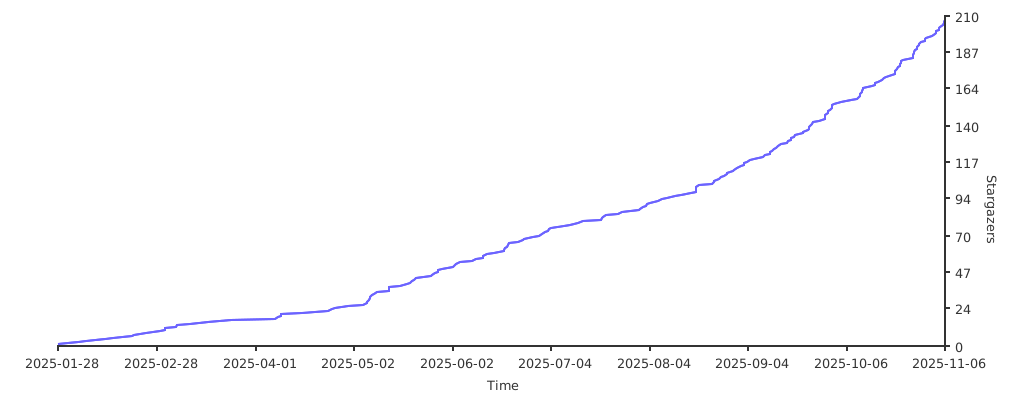
If you like this project, please give it a ⭐️ to show your support!


📘 Project Introduction
FastApiAdmin is a completely open-source, highly modular, and technologically advanced modern rapid development platform designed to help developers efficiently build high-quality enterprise-level backend and frontend systems. This project adopts a frontend-backend separation architecture, integrating the Python backend framework FastAPI and the mainstream frontend framework Vue3 to achieve unified development across multiple terminals, providing a one-stop out-of-the-box development experience.
Design Philosophy: With modularity and loose coupling at its core, it pursues rich functional modules, simple and easy-to-use interfaces, detailed development documentation, and convenient maintenance methods. By unifying frameworks and components, it reduces the cost of technology selection, follows development specifications and design patterns, builds a powerful code hierarchical model, and comes with comprehensive local language support. It is specifically tailored for team and enterprise development scenarios.
🔗 Source Repositories
| Platform | Repository |
|---|---|
| GitHub | FastapiAdmin Main | FastDocs Website | FastApp Mobile |
| Gitee | FastapiAdmin Main | FastDocs Website | FastApp Mobile |
🎯 Core Advantages
| Advantage | Description |
|---|---|
| 🔥 Modern Tech Stack | Built with cutting-edge technologies like FastAPI + Vue3 + TypeScript |
| ⚡ High Performance | Leveraging FastAPI's asynchronous features and Redis caching for optimized response speed |
| 🔐 Secure & Reliable | JWT + OAuth2 authentication mechanism with RBAC permission control model |
| 🧱 Modular Design | Highly decoupled system architecture for easy expansion and maintenance |
| 🌐 Full-Stack Support | Integrated solution for Web + Mobile(H5) + Backend |
| 🚀 Rapid Deployment | One-click Docker deployment for quick production rollout |
| 📖 Comprehensive Docs | Detailed documentation and tutorials to reduce learning curve |
📦 Engineering Structure Overview
FastapiAdmin
├─ backend               # Backend project (FastAPI + Python)
├─ frontend              # Web frontend project (Vue3 + Element Plus)
├─ fastapp               # Mobile project (UniApp + Wot Design Uni)
├─ fastdocs              # Documentation project (VitePress)
├─ devops                # Deployment configurations
├─ docker-compose.yaml   # Docker orchestration file
├─ deploy.sh             # One-click deployment script
├─ LICENSE               # Open source license
|─ README.en.md          # English documentation
└─ README.md             # Chinese documentation
🛠️ Technology Stack Overview
| Type | Technology Selection | Description |
|---|---|---|
| Backend Framework | FastAPI / Uvicorn / Pydantic 2.0 / Alembic | Modern, high-performance asynchronous framework with mandatory type constraints and data migration capabilities |
| ORM | SQLAlchemy 2.0 | Powerful ORM library |
| Scheduled Tasks | APScheduler | Easily implement scheduled tasks |
| Authentication | PyJWT | Implement JWT authentication |
| Frontend Framework | Vue3 / Vite5 / Pinia / TypeScript | Rapidly develop Vue3 applications |
| Web UI | ElementPlus | Enterprise-level UI component library |
| Mobile | UniApp / Wot Design Uni | Cross-platform mobile application framework |
| Database | MySQL / MongoDB | Support for relational and document databases |
| Cache | Redis | High-performance cache database |
| Documentation | Swagger / Redoc | Automatically generate API documentation |
| Deployment | Docker / Nginx / Docker Compose | Containerized deployment solution |
📌 Built-in Functional Modules
| Module | Features | Description |
|---|---|---|
| 📊 Dashboard | Workbench, Analysis Page | System overview and data analysis |
| ⚙️ System Management | Users, Roles, Menus, Departments, Positions, Dictionaries, Configurations, Announcements | Core system management functions |
| 👀 Monitoring | Online Users, Server Monitoring, Cache Monitoring | System runtime status monitoring |
| 📋 Task Management | Scheduled Tasks | Asynchronous task scheduling management |
| 📝 Log Management | Operation Logs | User behavior auditing |
| 🧰 Development Tools | Code Generation, Form Builder, API Documentation | Tools to enhance development efficiency |
| 📁 File Management | File Storage | Unified file management |
🍪 Demo Environment
- 🌐 Official Website: https://service.fastapiadmin.com
- 💻 Web Demo: https://service.fastapiadmin.com/web
- 📱 Mobile: https://service.fastapiadmin.com/app
- 👤 Login Account:
adminPassword:123456
🚀 Quick Start
Environment Requirements
| Type | Technology Stack | Version |
|---|---|---|
| Backend | Python | ≥ 3.10 |
| Backend | FastAPI | 0.109+ |
| Frontend | Node.js | ≥ 20.0 |
| Frontend | Vue3 | 3.3+ |
| Database | MySQL | 8.0+ |
| Cache | Redis | 7.0+ |
Get the Code
# Clone the repository to your local machine
git clone https://gitee.com/tao__tao/FastapiAdmin.git
# Or
git clone https://github.com/1014TaoTao/FastapiAdmin.git
Backend Setup
# Navigate to the backend directory
cd backend

# Install dependencies
pip3 install -r requirements.txt

# Start the backend service: ensure that MySQL and Redis are running
python main.py run
# Or specify environment
python main.py run --env=dev

# Generate migration files
python main.py revision --env=dev
# Apply migrations
python main.py upgrade --env=dev
Frontend Setup
# Navigate to the frontend directory
cd frontend

# Install dependencies
pnpm install

# Start the development server
pnpm run dev

# Build for production
pnpm run build
Mobile Setup
# Navigate to the mobile directory
cd fastapp

# Install dependencies
pnpm install

# Start the H5 development server
pnpm run dev:h5

# Build for H5 production
pnpm run build:h5
Documentation Setup
# Navigate to the documentation directory
cd fastdocs

# Install dependencies
pnpm install

# Start the documentation development server
pnpm run docs:dev

# Build documentation for production
pnpm run docs:build
Access URLs
- 🏠 Official Website: http://localhost:5180
- 🖥️ Web Interface: http://localhost:5180/web
- 📱 Mobile Interface: http://localhost:5180/app
Default accounts:
- Admin:
admin/123456
🐳 Docker Deployment
# Copy the deployment script to the server and grant execution permissions
chmod +x deploy.sh

# Execute one-click deployment
./deploy.sh

# Common Docker commands
# View running containers
docker compose ps

# View container logs
docker logs -f <container_name>

# Stop services
docker compose down
🔧 Models
| Module | Screenshot |
|---|---|
| Login |  |
| Dashboard |  |
| Analysis |  |
| Menu |  |
| Department |  |
| Position |  |
| Role |  |
| User |  |
| Log |  |
| Config |  |
| OnlineUser |  |
| Server |  |
| Cache |  |
| Task |  |
| Dict |  |
| API Docs |  |
| Theme |  |
| Document |  |
| Lock |  |
| Form |  |
| Generator |  |
| Workflow |  |
| File |  |
| MyApps |  |
| Setting |  |
| AI |  |
Mobile
| Module | Details | Module | Details | Module | Details |
|---|---|---|---|---|---|
| Login |  |
Home |  |
Profile |  |
| Personal |  |
Settings |  |
Workbench |  |
🛠️ Secondary Development Tutorial
Backend Part
- Write the Entity Class Layer: Create the ORM model for the demo in
backend/app/api/v1/models/demo/example_model.py(corresponding to the entity class layer in Spring Boot). - Write the Data Model Layer: Create the demo data model in
backend/app/api/v1/schemas/demo/example_schema.py(corresponding to the DTO layer in Spring Boot). - Write the Persistence Layer: Create the demo data layer in
backend/app/api/v1/cruds/demo/example_crud.py(corresponding to the Mapper or DAO layer in Spring Boot). - Write the Business Layer: Create the demo data layer in
backend/app/api/v1/services/demo/example_service.py(corresponding to the Service layer in Spring Boot). - Write the Interface Layer: Create the demo data layer in
backend/app/api/v1/controllers/demo/example_controller.py(corresponding to the Controller layer in Spring Boot). - Register Backend Routes: Register the demo routes in
backend/app/api/v1/urls/demo_url.py. - Register Routes to the FastAPI Service: Register the routes in
backend/plugin/init_app.py. - Add the Demo Module to the System Initialization Script: Add it in
backend/app/scripts/initialize.py(if necessary, you can configure the demo menu permissions inbackend/app/scripts/data/system_menu.jsonandbackend/app/scripts/data/system_role_menus.jsonor from the frontend page menu). - Add the Demo Module to the Database Migration Script: Add it in
backend/app/alembic/env.py.
Code Generation Tutorial
The code generation module is one of the core features of this project, which can help developers quickly generate complete CRUD code and greatly improve development efficiency. This module is based on the Jinja2 template engine and can generate integrated front-end and back-end functional modules.
Code Generation Process
Create or Import Data Tables:
- Method 1: Create a new table directly in the system through the "Create Table" function
- Method 2: Import existing database tables into the code generator through the "Import" function
Configure Generation Parameters:
- Basic Configuration:
- Table name, table description, entity class name
- Generation Configuration:
- Generation package path (package_name): e.g.,
student - Generation module name (module_name): e.g.,
student - Generation business name (business_name): e.g.,
student - Generation function name (function_name): e.g.,
Student Management - Code generation method: zip package download or project directory write
- Parent menu: Select the menu category to which the generated function belongs
- Generation package path (package_name): e.g.,
- Basic Configuration:
Field Configuration:
- Configure each field:
- Field column type, Python type, Python field name
- Whether it is a primary key, auto-increment, required
- Whether it is an insert field, edit field, list field, query field
- Query method (equal, not equal, greater than, less than, range)
- Display type (text box, text area, dropdown box, checkbox, radio button, date control)
- Dictionary type (for dropdown data source)
- Configure each field:
Code Preview:
- Preview the code to be generated
- Support preview of backend (Python), frontend (Vue/TS), and database (SQL) code
- Filter preview content by type
Code Generation:
- Click "Download Code" to generate and download a zip package
- Click "Write to Local" to write directly to the project directory
Generated File Structure
The code generator will generate a complete front-end and back-end code structure:
Backend Files:
- Controller layer:
backend/app/api/v1/module_{module_name}/{business_name}/controller.py - Service layer:
backend/app/api/v1/module_{module_name}/{business_name}/service.py - Data access layer:
backend/app/api/v1/module_{module_name}/{business_name}/crud.py - Data model layer:
backend/app/api/v1/module_{module_name}/{business_name}/model.py - Data schema layer:
backend/app/api/v1/module_{module_name}/{business_name}/schema.py - Query parameter layer:
backend/app/api/v1/module_{module_name}/{business_name}/param.py
Frontend Files:
- API interface file:
frontend/src/api/module_{module_name}/{business_name}.ts - Page component file:
frontend/src/views/module_{module_name}/{business_name}/index.vue
Database Files:
- Menu SQL file:
backend/sql/module_{module_name}/{business_name}_menu.sql
Usage Example
- Create a new table in the database, such as
sys_student - Log in to the system and enter the Code Generation module
- Click "Import" and select the
sys_studenttable - Configure generation parameters:
- Generation package path:
student - Generation module name:
student - Generation business name:
student - Generation function name:
Student Management - Parent menu: System Management
- Generation package path:
- Configure field properties (such as setting which fields need to be displayed, queried, edited, etc.)
- Click "Preview Code" to view the generated code
- Click "Download Code" or "Write to Local" to generate a complete functional module
- Restart the service, and the new function module is ready to use
Frontend Part
- Configure the Frontend to Access the Backend Interface Address: Configure it in
frontend/src/api/demo/example.ts. - Write the Frontend Page: Write it in
frontend/src/views/demo/example/index.vue.
Mobile Part
- Configure the mobile access address for backend interfaces: Write the code in
fastapp/src/api. - Write mobile pages: Write the code in
fastapp/src/pages.
ℹ️ Help
For more details, please check the Official Documentation
👥 Contributors
🙏 Special Thanks
Thanks to the contributions and support of the following open-source projects:
🎨 Community
| WeChat QR Code | Group QR Code | WeChat Pay QR Code |
|---|---|---|
 |
 |
 |
❤️ Support the Project
If you like this project, please give it a ⭐️ Star to show your support! Thank you very much!